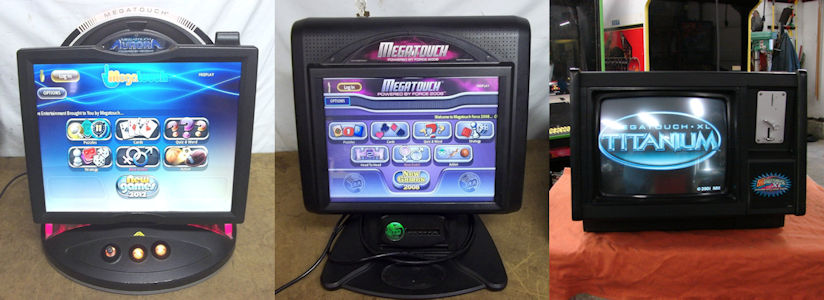
We provide a download manager which is used as a safe and secure way to download certain software updates and patches for your
machines. This program must be installed in order to download the software updates shown below. Once you download the program, you can click on the links
below to get the available software updates. To install the download manager, follow the steps below.
IMPORTANT:
This program is only for Windows 2000 (service pack 4), XP, Vista, or Windows 7 operating systems.
Additionally, it will only work with Internet Explorer.
To install the Download Manager:
-
Click here to get the Download Manager.
- Click Save File or Save to proceed (depending on your browser).
Note: On some browsers, you'll be given the option of running the program from its location on the Web. If you wish to do this, click Run and skip to Step 4.
-
The program will now be on your computer. Locate the program and open it.
-
When prompted, click Run.
-
The Merit Download Manager Setup Wizard will open. Click Next.
- If you wish to designate a location for the files, enter the folder location then press Next.
If you wish to accept the default location, simply press Next to proceed.
-
Select where you would like to create shortcuts for the Download Manager, then press Next.
- Click Install to begin the installation.
-
When prompted, click the Finish button to complete the installation and exit the Setup Wizard.
-
Now that you have downloaded the Download Manager, you can download the available updates below.
Make sure to follow the instructions carefully, especially with regards to how the update must be installed.
| AVAILABLE SOFTWARE DOWNLOADS |
|
| 1 | Ion 2012 Software |
| | This download is provided in the event that you need to reinstall your Ion 2012 software. | |
| | File Sizes: 2.8 GB & 4.2 GB |
|
| 2 | Ion 2011.5 Software |
| | This download is provided in the event that you need to reinstall your Ion 2011.5 software, or upgrade from Ion 2011 to Ion 2011.5. | |
| | File Sizes: 2.9 GB & 3.1 GB |
|
| 3 | Ion 2011 Software |
| | This download is provided in the event that you need to reinstall your Ion 2011 software. | |
| | File Sizes: 2.9 GB & 3.1 GB |
|
| 4 | Ion 2010.5 Software |
| | This download is provided in the event that you need to reinstall your Ion 2010.5 software, or upgrade from Ion 2010 to Ion 2010.5. | |
| | File Sizes: 3 GB & 2.9 GB |
|
| 5 | Ion 2010 Software |
| | This download is provided in the event that you need to reinstall your Ion 2010 software. | |
| | File Sizes: 3 GB & 2.8 GB |
|
| 6 | Ion 2009.5 Software |
| | This download is provided in the event that you need to reinstall your Ion 2009.5 software, or upgrade from Ion 2009 to Ion 2009.5. | |
| | File Sizes: 3 GB & 3.7 GB |
|
| 7 | Ion 2009 Software |
| | This download is provided in the event that you need to reinstall your Ion 2009 software. | |
| | File Sizes: 3.2 GB & 3.6 GB |
|
| 8 | Ion 2008.5 Software |
| | This download is provided in the event that you need to reinstall your Ion 2008.5 software, or upgrade from Ion 2008 to Ion 2008.5. | |
| | File Sizes: 2.7 GB & 3.3 GB |
|
| 9 | Ion 2007.5 Software |
| | This download is provided in the event that you need to reinstall your Ion 2007.5 software, or upgrade from Ion 2007 to Ion 2007.5. | |
| | File Sizes: 3.2 GB & 2.5 GB |
|
| 10 | Ion 2006.5 Software |
| | This download is provided in the event that you need to reinstall your Ion 2006.5 software, or upgrade from Ion 2006 to Ion 2006.5. | |
| | File Size: 3.3 GB |
|
| 11 | Force 2011 Software |
| | This download is provided in the event that you need to reinstall your Force 2011 software. | |
| | File Size: 3.5 GB |
|
| 12 | Force 2010.5 Software |
| | This download is provided in the event that you need to reinstall your Force 2010.5 software, or upgrade from Force 2010 to Force 2010.5. | |
| | File Size: 3.3 GB |
|
| 13 | Force 2010 Software |
| | This download is provided in the event that you need to reinstall your Force 2010 software. | |
| | File Size: 3.2 GB |
|
| 14 | Force 2009.5 Software |
| | This download is provided in the event that you need to reinstall your Force 2009.5 software, or upgrade from Force 2009 to Force 2009.5. | |
| | File Size: 3.1 GB |
|
| 15 | Force 2009 Software |
| | This download is provided in the event that you need to reinstall your Force 2009 software. | |
| | File Size: 3.6 GB |
|
| 16 | Force 2008.5 Software |
| | This download is provided in the event that you need to reinstall your Force 2008.5 software, or upgrade from Force 2008 to Force 2008.5. | |
| | File Size: 2.7 GB |
|
| 17 | Force 2007.5 Software |
| | This download is provided in the event that you need to reinstall your Force 2007.5 software, or upgrade from Force 2007 to Force 2007.5. | |
| | File Size: 3.2 GB |
|
|
| | |
| | | | | | | | | | | |